🎯 Simple Just 3 steps to beautiful diagrams

Code to Diagrams in Seconds

Paste a GitHub URL or describe your architecture. AI generates publication-ready visuals instantly.

See How It Works
overviz.com
Example Input
A Vision Transformer (ViT) architecture for image classification:

1. Input: Raw images split into 16x16 patches
2. Patch Embedding: Linear projection with positional embeddings
3. Transformer Encoder: 12 blocks with MHSA, Layer Norm, MLP
4. Classification Head: MLP on [CLS] token
5. Output: Softmax over 1000 ImageNet classes
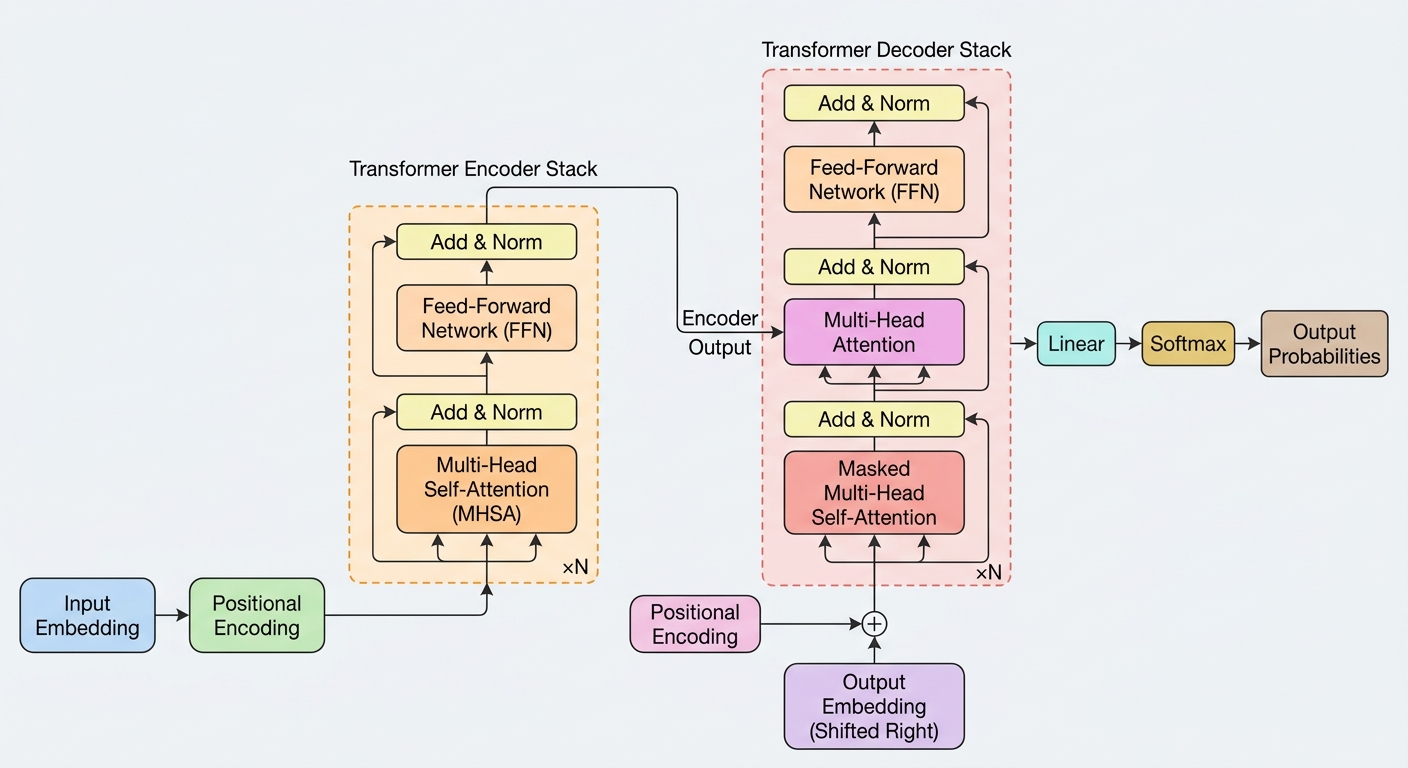
Generated Result
Vision Transformer Architecture Diagram

Publication-ready NeurIPS style diagram

Three simple steps

No design skills required. Just describe what you're building.

📝
Option A: Paste GitHub URL
github.com/tensorflow/tensorflow

Option B: Describe in English
"My app has a React frontend, Node.js API, and MongoDB database..."
1

Provide Your Input

Choose how you want to describe your architecture. Either paste a public GitHub repository URL, or write a plain English description of your system.

💡 Tips
  • For GitHub: Works with any public repository
  • For text: Mention components, databases, and how they connect
  • Be specific about the tech stack for better results

AI Analyzes Your Architecture

Our AI reads through your codebase or description and identifies all the key components: databases, services, APIs, frontends, and how they're connected.

🤖 What AI Detects
  • Frontend frameworks (React, Vue, Angular)
  • Backend services and APIs
  • Databases and storage systems
  • Data flow and connections
2
🔍
Components Found:
✓ React Frontend
✓ FastAPI Backend
✓ PostgreSQL Database
✓ Redis Cache
✓ AWS S3 Storage
🎨
Choose Your Style:

📄 NeurIPS 2D - Academic papers
🔮 DeepMind 3D - Glass blocks
📐 Blueprint - Engineering
🌌 Dark Mode - Presentations
3

Generate & Download

Pick your preferred visual style and hit generate. In seconds, you'll have a publication-quality diagram ready to download as a high-resolution PNG.

📥 Output Options
  • High-resolution PNG (perfect for papers)
  • 4 visual styles to choose from
  • Instant download, no watermarks

🚀 Try It With an Example

Not sure what to write? Click an example below to see OverViz in action.

🧠
ML Pipeline
Transformer model with training and inference
🌐
Web Application
Full-stack app with React, API, and database
☁️
Microservices
Distributed system with message queues

Everything you need

Professional diagram generation made simple.

🔍

GitHub Scanner

Paste any public repository URL. We'll analyze the codebase structure, dependencies, and architecture patterns automatically.

✏️

Plain English Input

No GitHub? No problem. Just describe your system in plain English and let AI figure out the components and connections.

🎨

4 Visual Styles

NeurIPS academic, DeepMind 3D glass, engineering blueprint, or cyberpunk dark mode. Pick the perfect look for your use case.

📄

Publication Ready

Diagrams are designed to look professional in research papers, technical docs, presentations, and patent applications.

Instant Download

High-resolution PNG files ready in seconds. No watermarks, no waiting. Just click download and you're done.

🤖

Powered by AI

Built on latest AI models for accurate analysis and stunning image generation that truly understands your architecture.

Four beautiful styles

Choose the perfect aesthetic for your use case.

📄

NeurIPS 2D

For academic papers
🔮

DeepMind 3D

Glass blocks aesthetic
📐

Blueprint

Engineering style
🌌

Dark Mode

Cyberpunk aesthetic

Frequently Asked Questions

Everything you need to know about OverViz.

OverViz is perfect for creating architecture diagrams for research papers (NeurIPS, ICLR, etc.), technical documentation, presentations, patent applications, and any situation where you need a professional system diagram. It's especially useful for ML/AI researchers and software engineers.
No design skills needed at all! Just describe your architecture in plain English or paste a GitHub URL. Our AI handles all the visual design work, creating professional diagrams that look like they were made by a graphic designer.
The best descriptions include: the main components (frontend, backend, database), the technologies used (React, FastAPI, PostgreSQL), and how they connect. For example: "A React frontend calls a FastAPI backend, which stores data in PostgreSQL and uses Redis for caching." Be specific but concise.
Currently, OverViz only works with public GitHub repositories. For private repos, you can use the text description option instead - just describe your architecture manually and get the same great results.
Diagrams are generated as high-resolution PNG files, perfect for inserting into papers, docs, or presentations. The images are created at publication quality with no watermarks.
Free users get 5 diagram generations per month. The limit resets at the start of each month. This is usually enough for most research projects or documentation needs.

Ready to create beautiful diagrams?

Start visualizing your architecture in seconds. Free to try.

← Back to Home
🔍
Scan GitHub Repository
Extract architecture from any public repo
✏️
Describe Architecture
Write in plain English

🎨 Architecture Analysis

Architecture Title

Architecture description will appear here...

Components Detected

Generated Diagram

Click "Generate Diagram" to create your visualization